General Q&A
When trying read IR key codes by executing the command ir-keytable -t, I receive a: /sys/class/rc/: No such file or directory. No devices found error.
-
Test the IR remote with a mobile phone.
Turn on the mobile phone camera and point it at the remote sensor. Push a remote button. If the IR transmitter LED turns on when pressing a remote key, the remote is functional.
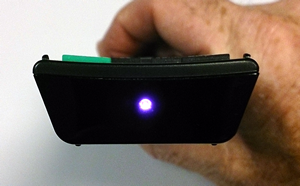
-
Remove all instances of Meson_IR and AmRemote configuration files on /storage and /flash partition.
To make /flash accessible run in ssh:
mount -o remount,rw /flashOR
remove SD/Emmc and use a PC.
-
Reboot / restart / startup the device once all configuration files have been removed.
-
ssh into device:
ssh root@<ip_of_device>
- Stop kodi and eventlircd:
systemctl stop kodi
systemctl stop eventlircd
- Try:
ir-keytable -p NEC,RC-5,RC-6,JVC,SONY -t
ir-keytable -u (1)
ir-keytable -u -v
- Another way is to "reset" the decoder status by removing these files:
/flash/remote.disable
/storage/.config/remote.disable
- Meson-ir also can be forced by touching (2):
/flash/remote.force_meson_ir
/storage/.config/remote.force_meson_ir
NOTES:
(1) ir-keytable -u starts the IRMP decoder containing most of the known IR protocols.
(2) this should make the presence of (a) remote configuration file(s) irrelevant.
If there is still no output on the console when pushing buttons on the remote, it is likely the IR transmitter is incompatible or the receiver broken.